folio 24 of 46
why i built a canvas to keep my agent fleet out of my head
- date
- 28 JUL 2026
- era
- Fable
- status
- live
- form
- tool
- updated
- 31 JUL 2026
from doing to steering: how termcanvas grew from a spatial experiment into a tmux-backed tool that keeps a current-canvas agent tree and one focused terminal in view, and why attention became the scarce resource.
How can we effectively integrate AI into everything we do?
That is the line I wrote in June 2025, in a post called Maximizing AI Integration in Daily Life. My answer then was to track inputs and feed all of it to an AI that would analyze my life back to me. Lists. Four areas of human life to enhance. Next steps. It read like a plan because it was a plan, and I hadn't lived it yet.
A year later the shape is wrong in a way I couldn't see from inside it. Two moves, not one. The move I thought was the point, feeding my data to AI, turned out to be the smaller half. The bigger half is the reason termcanvas exists: I stopped being the guy doing the stuff.
the simplest reason i built termcanvas is that i needed to keep my mind in order.
i was already using zed and looking at apps like conductor. they were useful, but the center of those tools was code. my agents were no longer doing only code. i had terminals open for research, content, music, long-running commands, logs, and several projects at once.
i could start all of that work. i could not hold its shape in my head.
the available tools kept asking me to adapt the work to their interface. i wanted the opposite: ordinary terminals that could contain whatever i was doing, arranged in a way my mind could understand.
so i made my own.
this started before termcanvas
on 2 april i published a small project called Canvas Agents. it put image and video agents directly on an infinite canvas. i was testing a simple interaction: the agent should work beside the artifact, not live in a chat box somewhere else.
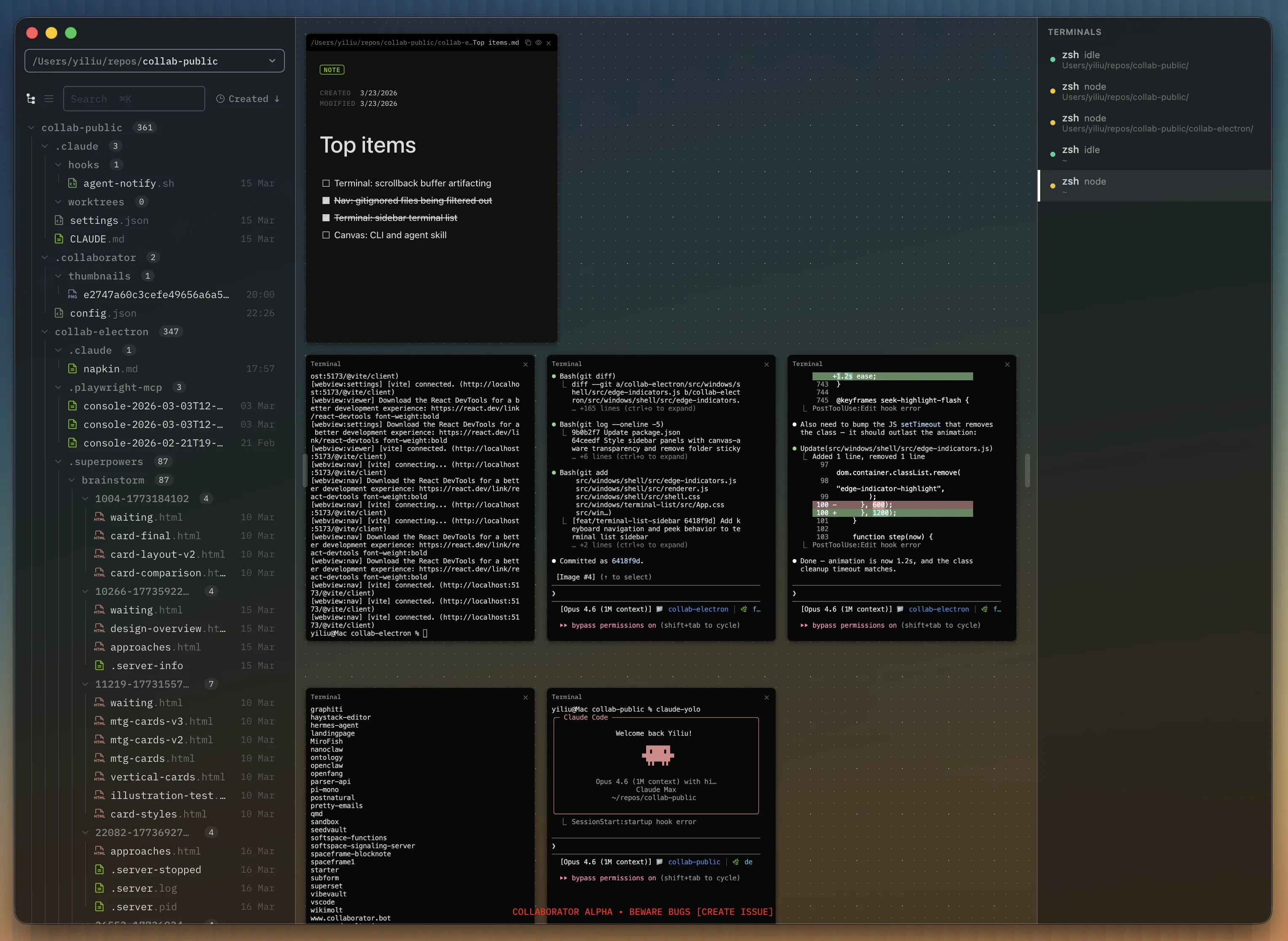
Canvas Agents and termcanvas were different apps. one worked with images and video; the other began with real shell terminals. but they came from the same frustration. i did not want the agent hidden behind a conversation while the actual work lived somewhere else.
the Canvas Agents app is closed now. the idea survived.
when i moved from media generation to a growing fleet of coding and general-purpose agents, the document became the terminal. that was the beginning of termcanvas.
why a canvas
tabs are fine until i have enough of them that the labels stop meaning anything. a list tells me what exists, but not how the work is structured. a kanban board tells me where a task sits, but the terminal doing the task is still somewhere else.
the word canvas comes from the interaction i was trying to build. the public version i am asking people to use today is more restrained than that first picture. it shows one focused terminal at a time. the left rail keeps a live spawn tree, and the header keeps a fleet summary for the current canvas.
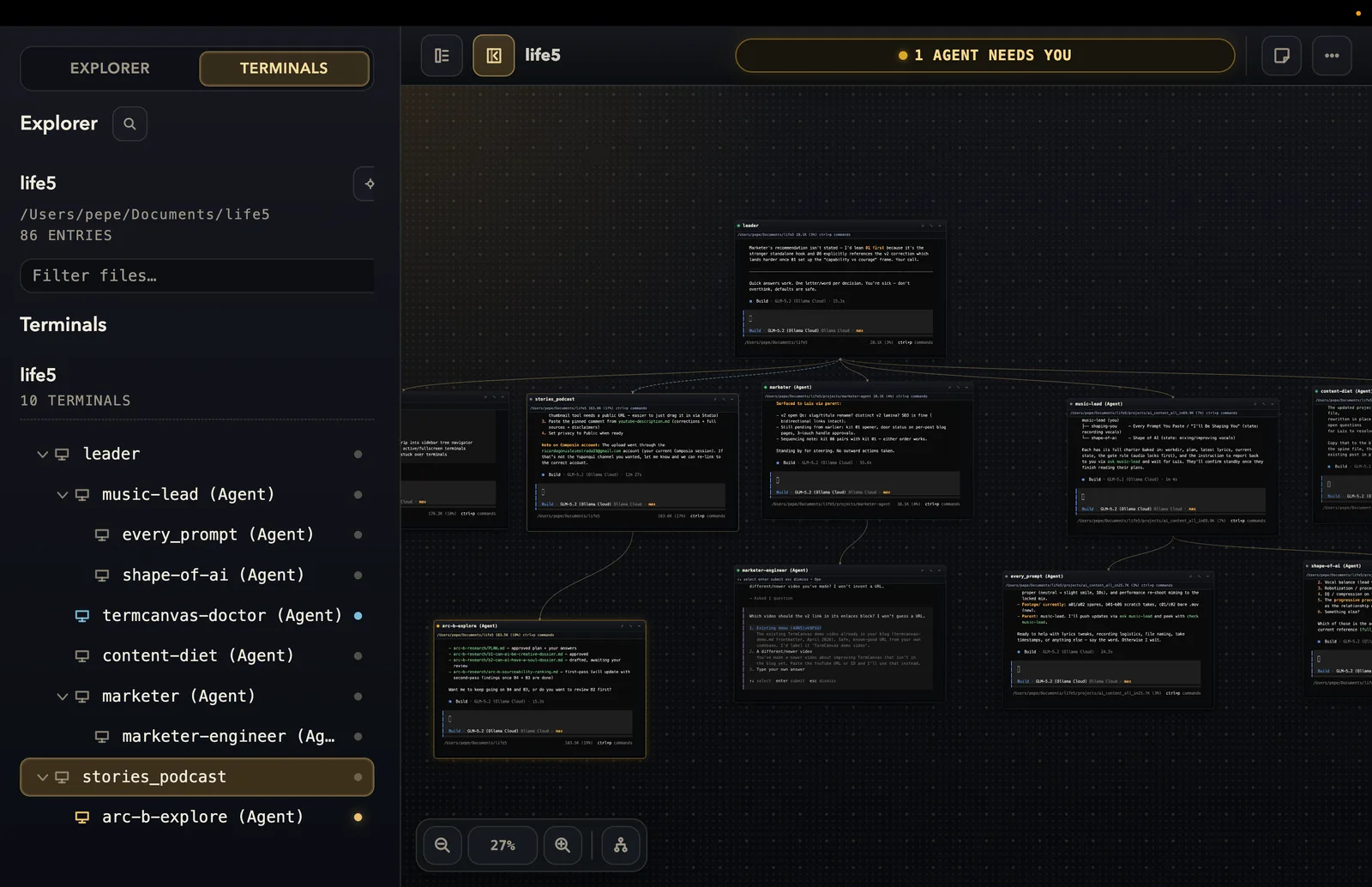
by hierarchy, i do not mean that one permanent commander controls every other agent. termcanvas tried that model and later removed it. the current runtime lets an agent create a child, connect to a peer, or delegate work directly.
the tree answers the part i actually need on screen: who spawned whom? which agents belong to this branch of work? the header answers a different question: what is the current state of the managed agents on this canvas, including working, idle, done, stale, failed, and waiting. agentmux can also keep peer links in the runtime so agents can address each other. v0.3.10 does not draw those links as lines in the interface.
i still think spatially about the work. that is why i kept the name. but i do not want to pretend the public build gives me a magic overview of every terminal at once. it gives me one terminal to steer and a sidebar that keeps the branch from disappearing out of my head.
the first version was just real terminals
the first termcanvas commits also landed on 2 april. on 7 april the app got its name. three days later i published the original blog entry:
If you're going to steer a fleet of agents, you need a cockpit. I built TermCanvas: terminals on an infinite canvas, each agent in its own node, connected as a graph. It's the tool I write this chronicle from.
that was the whole post.
the app was real, but my explanation was ahead of the implementation. it was mostly a visual terminal board. i could create terminals, drag them around, zoom the canvas, and bind a workspace to each canvas. it felt better than tabs, so i kept using it.
the first technical choice still defines the app: every node is a real interactive terminal.
termcanvas uses electron for the desktop shell, xterm.js for terminal rendering, and node-pty for the shell process. the renderer never owns the shell. terminal processes and filesystem access stay in electron's main process, behind a narrow ipc bridge.
this matters because i did not want a fake agent dashboard that summarized work happening somewhere else. i wanted to click a node and be inside the actual session.
making the terminals survive the canvas
the next problem was continuity.
if closing the app killed every terminal, termcanvas would be a nicer-looking way to lose work. i put tmux underneath the terminal sessions so the app could detach without stopping them. termcanvas saves the canvas layout and a stable identity for each terminal. when it opens again, it reconnects the node to the existing tmux session.
there is an important difference between closing the app and closing a node. closing the app preserves a tmux-backed session. clicking x on a terminal destroys it. if tmux is killed outside the app, or the machine reboots without restoring tmux, the live process is gone even if the visual layout remains.
that distinction caused some of the least glamorous bugs in the project. terminal attachment ids change; terminal identity must not. a canvas can restore perfectly while the shell underneath it is wrong, missing, or duplicated. getting that lifecycle right mattered more than another canvas animation.
agentmux was the hard part
the hardest part was syncing agentmux with the app.
a terminal canvas can treat every node as an isolated shell. an agent cockpit cannot. when an agent creates another agent, the new session has to appear in the current canvas's sidebar with the right name, parent, and state. tmux, the agentmux database, and the electron renderer do not update on one clock.
early versions could know that a worker existed without showing it correctly. an agent could be alive in tmux but absent from the tree. the sidebar could hold stale state after the runtime had moved on. relaunching the app added another chance for the two views to disagree.
agentmux became the addressing layer underneath the interface. every managed terminal receives its project and agent identity through environment variables. an agent can ask who its neighbors are, create a child, connect to a peer, delegate with ask, and read another agent's result. termcanvas uses that runtime to update the sidebar tree and the current-canvas fleet summary.
the peer links matter because they let agents address each other. in the public build, they are runtime relationships, not lines i can point to on the canvas. the terminal remains the control surface. the sidebar is the honest view of the branch i am steering.
i removed the commander
the first managed-agent design had a commander and workers underneath it. that gave me the hierarchy i wanted quickly, but it made authority and visual structure the same thing.
real work was messier. a testing agent might need to ask a research agent something directly. a child might spawn its own child. sometimes i wanted several roots on the same canvas without pretending one of them was the boss.
on 2 july i changed agentmux from the fixed commander/worker tree into a peer graph. any terminal can now be a command center. spawning still creates lineage, so the hierarchy remains visible, but lineage no longer decides who is allowed to talk to whom.
that change is why agentmux keeps spawn lineage and peer addressing separate. the public termcanvas build shows the spawn tree in the sidebar. peer links still matter underneath it, but i am not going to call them a visible graph until the interface actually draws them.
then i became the polling loop
once spawning agents worked, starting another one became cheap.
i could run claude code in one terminal, codex in another, and opencode somewhere else. one agent changed the app while another checked tests. other canvases held work that was not code at all.
then i started checking them.
open one terminal to see if it is still working. switch to another because maybe it finished. check a quiet one in case it failed. return to the first and discover a question waiting there.
i did not have one dramatic accident that made the answer obvious. it was the repeated mental cost of asking the same question all day:
which one needs me right now?
the scarce resource isn't data. it's attention.
somewhere in that loop the first move of the original plan quietly finished itself. in 2025 i was still the one feeding the AI: notes, prompts, exports. now capture is passive. the vault, the agents that read what i am already writing, the screen the agent can look at when i ask it what i actually did today. in February i called this the symbiotic experiment, and the word i used then was intimacy. it sees my time, it learns my voice. the whole thing only works because capture stopped being something i do.
and once feeding stopped being the job, the real constraint showed up. the scarce resource isn't data anymore. it isn't even hours.
it's how many agents i can steer well at once.
managing agents, the attention is all you need. before i add a project i have to ask whether i have a free steering-slot, or whether i am already steering all the agents i can hold. spread too thin and they drift unwatched.
the learning curve is switching
the part nobody warned me about: switching projects has a learning curve. switching work has a learning curve.
the manager isn't the maker. the manager is the one who moves between the rooms. when i was the maker i could sink into one thing for a week and that was the old shape of focus. now focus looks different. now focus is holding six rooms in my head at once and giving each one the one good decision it needs from me this hour, then leaving. the agents do the rest.
i am not good at this yet. i still catch myself dropping into a room and staying, doing the work, because doing is what i know. the shift from doing to steering is a real thing you have to learn, and i am learning it in public, and it is slower than i thought.
the small feature that changed the product
termcanvas reads the current canvas and classifies managed agents when it recognizes an output pattern. the header compresses states including working, idle, done, stale, failed, and waiting into one summary.
there is also an amber attention chip. it is heuristic. v0.3.10 recognizes the current OpenCode option selector pattern, but it can still miss prompts from other harnesses or future interfaces.
so that is not the thing i am asking people to trust on launch. the part i can show is simpler: a current-canvas fleet summary, a sidebar tree of who spawned whom, and one real terminal i can steer without losing the branch around it.
i do not need agents to make every decision for me. i need them to keep working, then make it easier to return to the right piece of work when my judgment is required. that is still the point of the tool...
the frontier is the cockpit
here is the part i don't have an answer for.
you need tools to visualize what is happening while you steer a lot of agents. a lot of people are creating those tools right now, and nobody in the agent-cockpit space has a finished design. it's exploration, not solved.
termcanvas is my entry. how do you steer twenty agents at once and actually see which one is drifting? how do you know which room needs you next? i don't know. i don't think anyone does.
watch the 5-minute walkthrough of the current build doing both: what it is, and how it works on real work.
why i keep building it
i keep building it because the fleet is how i work now. code is one part of it. the current canvas can hold sessions for research, content, a long process, and the terminal where i decide what happens next. i see one focused terminal at a time, while the left rail keeps the branch nearby and the header keeps its current fleet state nearby. tools centered only on coding do not give me that relationship to the work.
the deeper reason is still the plain one: i want my mind in order.
agents are useful when they increase what i can do without taking judgment away from me. termcanvas is my attempt to build the interface for that relationship. let the agents carry execution. show me the hierarchy. leave the choice with me.
where it is now
v0.3.10 is available as a dmg and zip. it runs on apple-silicon macs and requires tmux for managed agents plus python 3 for the bundled agentmux wrapper. the build is unsigned, so macos asks for approval the first time it opens. i am the only maintainer.
the public interface is one focused terminal at a time. the sidebar shows the current canvas's spawn tree, and the header shows its fleet summary. peer links and agent communication are real runtime behavior, but they are not drawn as lines in this build. status detection can be wrong, and the attention chip is still heuristic. closing the app can preserve a surviving tmux session; i am not promising recovery through a machine reboot.
it is not cross-platform. a large canvas can become its own kind of noise. i am still finding out whether this works for people whose minds and agent fleets look different from mine.
if you already run several agents, try it on real work and tell me where the sidebar stops helping. that is more useful than telling me the screenshot looks nice.
we are at that edge.
sources
folio 24 of 46 · written in cusco, peru, 28 JUL 2026 · updated 31 JUL 2026